
Traveler Tracking · A Module of mTrip’s Risk Management Platform
Traveler Tracking Software for Business Travel
mTrip’s traveler tracking software locates every business traveler in real time, whether or not they use the mobile app, and puts that view on one online dashboard built for duty of care.
Travelers who install the mobile app are located by GPS. Travelers who don’t are still tracked from their itinerary data, so coverage never depends on app adoption. It’s an optional add-on to mTrip’s full travel risk management platform, and it also runs on its own.

In short
- Travelers with the app are located by GPS, opt-in
- Travelers without it are tracked from their itinerary automatically
- One dashboard shows both, filterable and exportable for compliance
Trusted by leading travel brands









When something happens, half your travelers are unreachable
You can only protect the travelers you can actually find
The problem: Most travel programs can locate the travelers who installed the company app and turned on location sharing. Everyone else, the travelers who skipped the download, disabled GPS, or booked outside the usual channel, becomes a phone call and a guess during an incident.
The solution: mTrip’s traveler tracking closes that gap. Every traveler with an active itinerary is trackable, by GPS if they use the app, by itinerary data if they don’t, so a manager’s map is never missing half the program.
-
APP-ONLY TRACKINGOnly shows travelers who installed the app and enabled GPS
-
MANUAL PNR LOOKUPConsultants search bookings one by one to guess who’s where
-
OUTDATED SPREADSHEETSRebuilt from GDS exports, stale as soon as a trip changes
-
WITH mTRIPEvery traveler on one map, tracked by GPS or itinerary automatically
Two tracking methods, one dashboard
Tracking That Doesn’t Depend on App Adoption
Some travelers install the mobile app; some never do. mTrip tracks both groups, so duty of care coverage doesn’t stop at the travelers who downloaded something.
Precise GPS tracking through the branded mobile app
Travelers who install mTrip’s white-label mobile app can be located with GPS precision. Location sits on top of the same itinerary they already use for flights, hotels, and travel documents, so tracking is a byproduct of an app travelers actually open, not a separate tool to remember.
Location sharing is opt-in. Travelers keep control of their own consent, and managers see a live position the moment it’s needed, not a stale last-known point.
- GPS-precision location from the mobile app
- Opt-in consent, controlled by the traveler
- Same app travelers already use for their itinerary
- Live position, not a cached last-known location
- Works alongside push, email, and SMS risk alerts
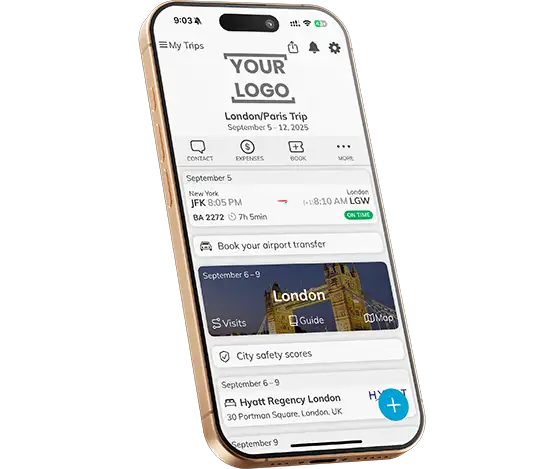
Itinerary-based tracking when travelers skip the app
Duty of care can’t depend on which travelers happened to install an app. For travelers without it, mTrip determines location from their travel itinerary, flights, hotels, and other booked segments pulled automatically from your GDS or mid-office system.
Coverage doesn’t stop at the main booking engine. Trips booked outside it can be added manually, so a traveler on an independent side trip still shows up on the map.
- Location inferred from live itinerary and booking data
- No manual PNR lookups during an incident
- Covers travelers who never installed the app
- Includes bookings made outside the main booking engine
- Syncs automatically from GDS and mid-office integrations
Manager Dashboard
One dashboard to see every traveler, wherever they are
Every active traveler lands on the same map, whether they were located by GPS or itinerary data, so travel consultants and risk managers work from one screen instead of switching between the GDS, the app admin panel, and a spreadsheet.
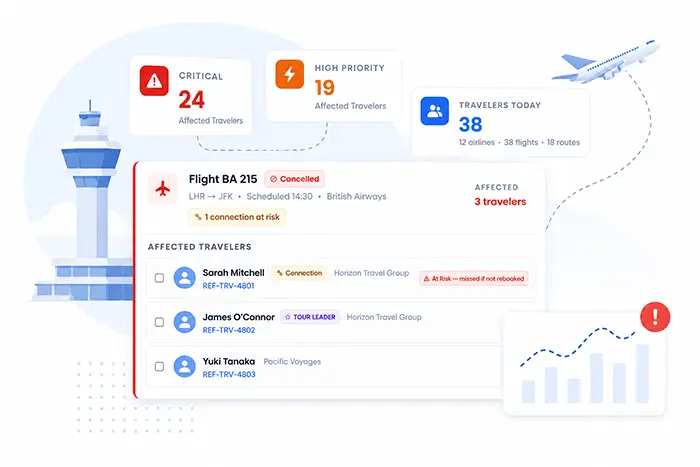
- Filter by agency, corporate account, country, destination, or individual traveler
- Automated risk assessments layered on top of each traveler’s location
- Direct push notification, email, or SMS to affected travelers
- Analytics and reporting across the whole traveler base
- Export to Excel for incident response and compliance documentation
- Centralizes all traveler tracking data in one customizable interface
Who it’s for
Two People, One Live View
Traveler tracking serves the traveler on the road and the manager watching over the program, each with a purpose-built view.
Business Travelers
Travelers who install the app control their own location sharing, right inside the app that already holds their itinerary. Travelers who don’t are still covered, with nothing extra for them to set up.
- Opt-in GPS sharing. Consent stays with the traveler; sharing can be turned on or off at any time.
- No separate app to install. Location tracking sits inside the same app used for flights, hotels, and documents.
- Covered either way. Travelers who skip the app are still tracked from their booked itinerary.
Travel Consultants & Risk Managers
Travel consultants, risk managers, and travel managers get a live map of the whole program and the tools to act the moment something changes.
- Real-time dashboard. Every traveler on one map, filterable by account, country, destination, or individual.
- Direct communication. Push, email, or SMS to affected travelers straight from the dashboard.
- Compliance reporting. Location history and dispatch logs exportable to Excel for duty of care audits.
Why teams choose it
Built for Programs Where Every Traveler Counts
Dual Tracking Modes
GPS through the mobile app and itinerary-based tracking for everyone else, so coverage never depends on app adoption.
Opt-In Privacy Controls
GPS sharing is opt-in and traveler-controlled. Itinerary-based tracking covers the rest without requiring extra consent flows.
Real-Time Manager Dashboard
One live map filterable by agency, account, country, destination, or individual, instead of a spreadsheet rebuilt by hand.
GDS & Mid-Office Integration
Itinerary data syncs automatically from Amadeus, Sabre, Travelport, and your mid-office system, no manual data entry.
Compliance-Ready Exports
Location history, alert dispatch logs, and trip summaries export to Excel for duty of care audits and incident reports.
Native Platform Integration
Runs on its own or alongside mTrip’s business travel app and full risk management module.
Integrates with
Connected to the systems your program already runs on
Itinerary data flows in automatically from your booking and mid-office stack, so the tracking dashboard is always working from live bookings, not a manually maintained list.
| Category | Supported Platforms |
|---|---|
| GDS Systems | Amadeus, Sabre, Travelport |
| Mid-Office & Back-Office | Cornerstone, TravelPerk, BCD Travel, Egencia, and more |
| Risk Intelligence | Multiple providers supported concurrently, configurable per corporate account |
See how mTrip manages travel data across GDS, mid-office, and back-office systems on the travel data management page.
Questions TMCs and travel managers ask
Common questions about mTrip traveler tracking software
General & How It Works
What is traveler tracking software?
Traveler tracking software locates business travelers during a trip so travel managers and risk managers can protect them and respond quickly to an incident. mTrip’s version tracks travelers two ways: by GPS through the mobile app, or by itinerary data for travelers who don’t use the app, so coverage isn’t limited to app adoption.
How does mTrip track travelers who don’t install the mobile app?
For travelers without the app, mTrip determines location from their travel itinerary, flights, hotels, and other booked segments synced automatically from your GDS or mid-office system. Bookings made outside the main booking engine can also be added manually, so independent side trips still show up on the dashboard.
Is GPS location sharing mandatory for travelers?
No. GPS tracking through the mobile app is opt-in. Travelers who choose not to share their location are still covered through itinerary-based tracking, so duty of care doesn’t depend on individual consent to GPS specifically.
Dashboard, Data & Privacy
What can travel managers do from the traveler tracking dashboard?
Managers can filter travelers by agency, corporate account, country, destination, or individual, see automated risk assessments layered on each traveler’s location, message affected travelers directly by push, email, or SMS, and export data to Excel for compliance and incident reporting.
Can we export traveler location and tracking data for compliance?
Yes. The dashboard exports traveler data, dispatch logs, and trip summaries to Excel, giving travel managers and risk managers documentation for duty of care audits and incident reports.
Is mTrip’s traveler tracking white-label?
Yes. Like the rest of the mTrip platform, traveler tracking deploys under your organization’s own brand and domain, whether it runs standalone or alongside the mobile app and risk management module.
Fit, Integration & Pricing
Does traveler tracking work with our GDS and mid-office systems?
Yes. mTrip integrates with Amadeus, Sabre, and Travelport, along with mid-office and back-office tools including Cornerstone, TravelPerk, BCD Travel, and Egencia, so itinerary data flows into the tracking dashboard automatically.
How is traveler tracking different from mTrip’s full risk management platform?
Traveler tracking is one of four modules in mTrip’s travel risk management platform, alongside real-time risk alerts, country intelligence, and automated pre-travel advisories. It runs standalone or as part of the full platform; combining it with the other modules adds destination risk scoring and proactive alerting on top of location visibility.
Does traveler tracking cost extra on top of the base platform?
Yes, it’s priced as an add-on module alongside mTrip’s full risk management platform, scoped to your program size. Smaller TMCs get the same real-time visibility as larger operators without an enterprise-scale contract. Contact mTrip’s team to discuss scope and pricing.
Explore the Platform
Related mTrip Solutions for Business Travel
Ready when you are
See every traveler on one map, however they’re tracked
Join the TMCs and corporations running duty of care on mTrip. See the tracking dashboard, the traveler app, and your own branding live in a 30-minute call.
GPS and itinerary-based tracking in one dashboard. Not a spreadsheet.