
TMC software
TMC Software That Consolidates Booking Data and Delivers It Under Your Brand
mTrip connects to your GDS, OBT, and back-office systems and unifies every booking into one trip record per traveler, a super PNR for the whole trip. Your agents send one branded itinerary, as an app, web itinerary, or PDF, instead of separate documents in different formats. Duty of care and disruption management is an optional add-on.
Connects to GDS · OBT · Mid/back office · Profile management · and more
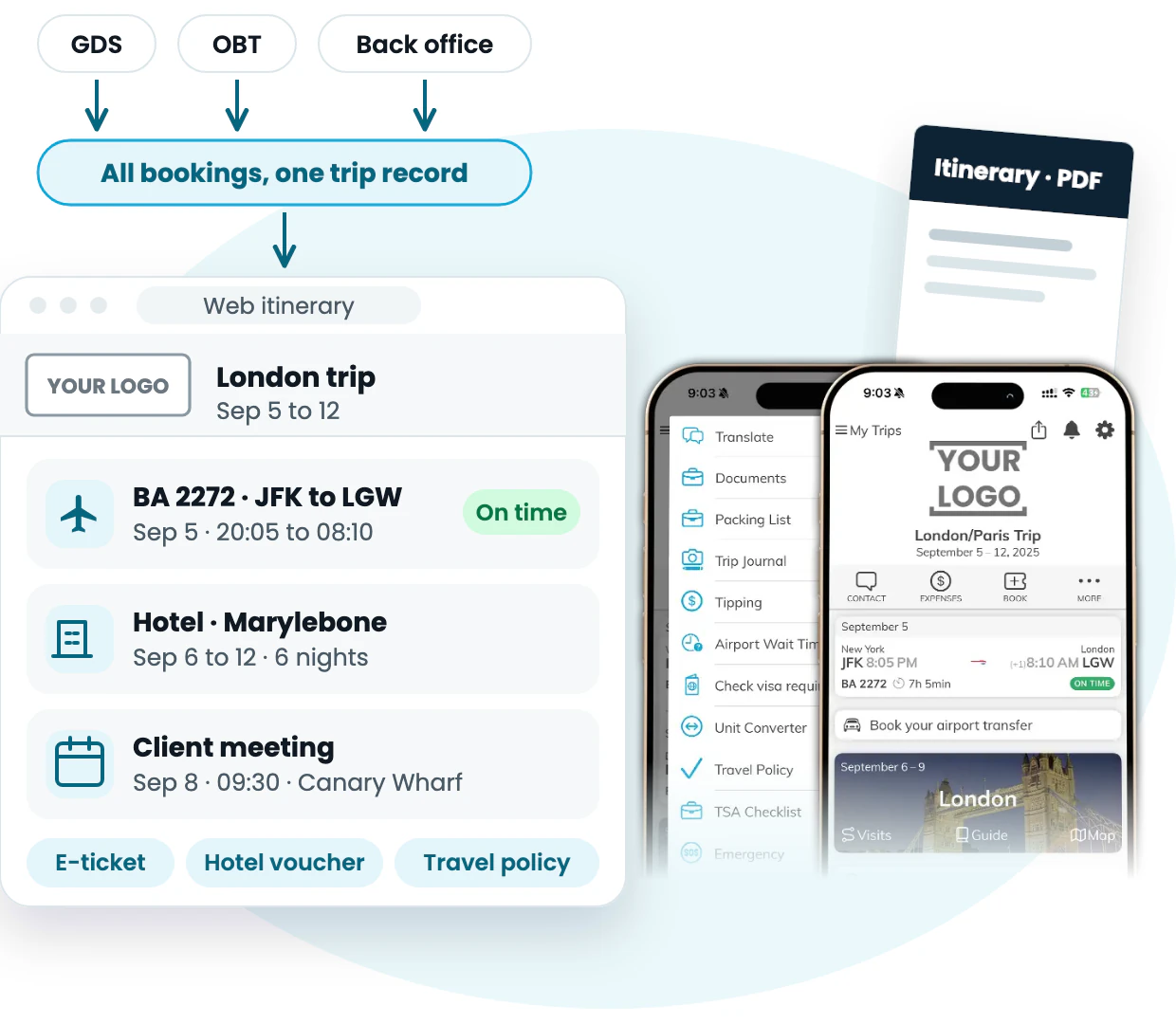
One trip record as a web itinerary, PDF, and mobile app. The app is a real screenshot. The web and PDF views are illustrations with sample data.
Trusted by 300+ travel companies across 35+ countries









- Countries
- 35+
- Founded
- 2009
- Travel Brands
- 300+
- Trips Managed/year
- 4M+
- Rated on G2
- 4.9/5
Travel brands powered by mTrip’s integrated platform
- Wings Travel — global travel management company using mTrip’s integrated travel technology platform
- TravelStore — full-service TMC using mTrip’s Itinerary Builder and Mobile App platform
- Schiphol Travel — Netherlands-based travel management company using mTrip’s integrated travel technology platform
- Atlas Travel — corporate travel management company using mTrip’s white-label itinerary and mobile app platform
- Adtrav — specialized TMC using mTrip’s integrated travel technology platform
- TAG — luxury and corporate travel management company using mTrip’s Itinerary Builder and Mobile App
- Fox World Travel — corporate travel management company using mTrip’s integrated mobile and itinerary platform
- ATPI Copastur — Brazil’s leading TMC using mTrip’s white-label travel app and itinerary builder
- Omega World Travel — full-service travel management company using mTrip’s white-label itinerary and mobile app platform
What is TMC software
What is TMC software, and where does mTrip fit?
TMC software is the technology a travel management company uses to run corporate travel for its clients. Booking tools such as a GDS and an online booking tool (OBT) handle search and ticketing. mTrip is the post-booking platform on top of them.
It pulls bookings from Amadeus, Sabre, Travelport, Concur, Cytric, and your back-office system into one structured record per traveler, a super PNR for the whole trip.
From that record, mTrip delivers branded itineraries, e-tickets, vouchers, and flight alerts through a mobile app, a web itinerary, and PDF, so agents send one itinerary instead of separate documents in different formats, with branding and features set for each corporate client.
An optional duty-of-care and disruption management module adds risk monitoring, disruption alerts, and traveler tracking.
mTrip has been built in-house since 2009, serves 300+ travel brands in 35+ countries, and handles more than 4 million trips a year. Most TMCs go live within a few weeks, with a dedicated Customer Success Manager.
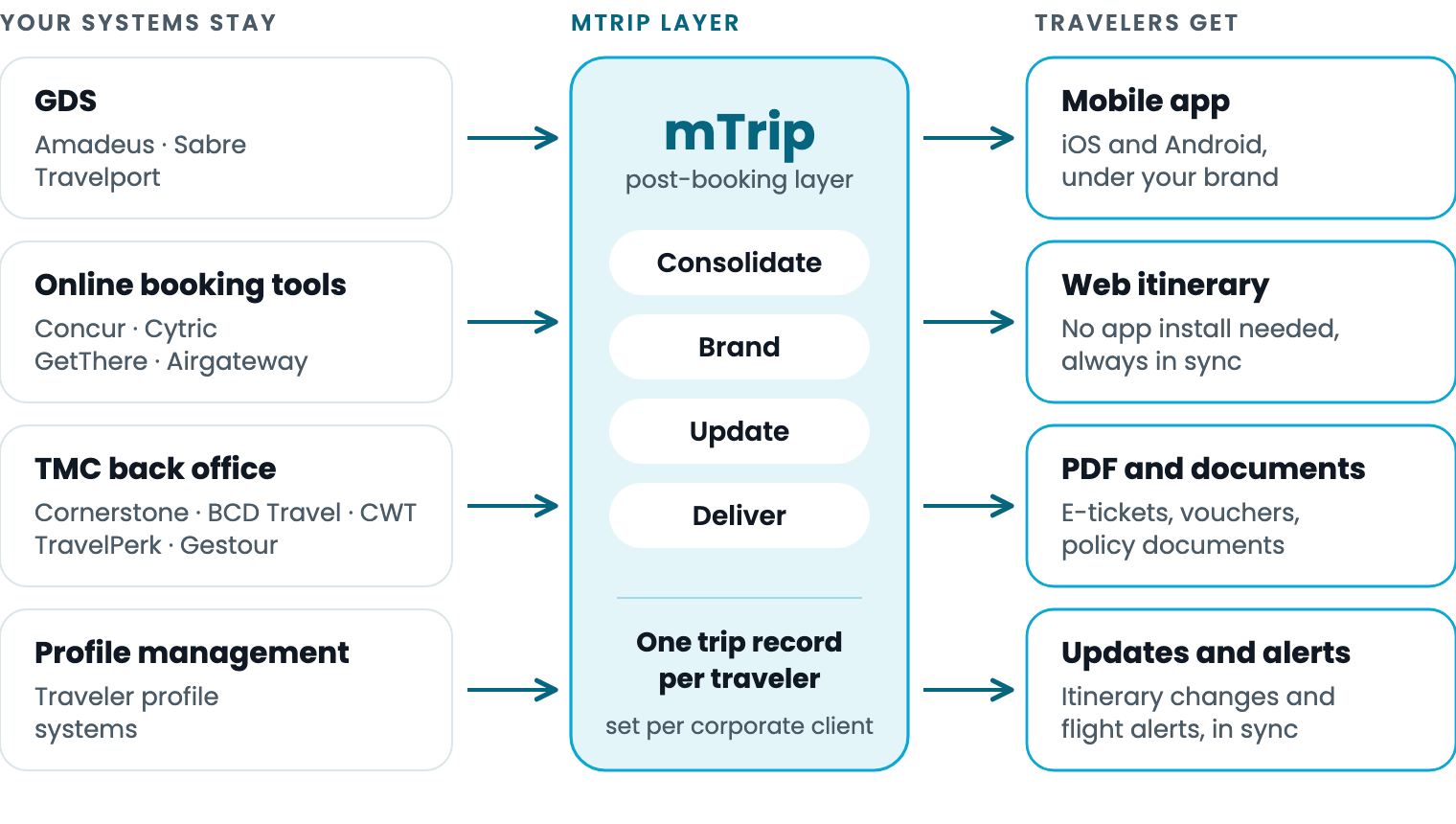
Your booking, back-office, and profile systems stay in place. mTrip turns their data into one branded trip record per traveler.
How it works
From separate bookings to one unified branded itinerary
Your TMC keeps booking and expense workflows in its existing systems. mTrip handles what happens after the ticket is issued: unifying the bookings, branding the trip, and keeping every format current.
What is a super PNR?
A super PNR is a single trip record that combines every booking of a traveler’s trip: the flights, hotels, cars, and rail booked across the GDS, the online booking tool, and the back-office system. A standard PNR holds the reservation made in one system, so a trip booked in several systems leaves an agent with separate records and separate confirmations.
mTrip builds the super PNR for the whole trip, then delivers it as one branded itinerary in the app, the web itinerary, and PDF. Travelers can also forward bookings they made themselves, and mTrip’s AI adds them to the same record.
1 · Unify every booking
Bookings from your GDS, OBT, and back-office system become one structured itinerary per traveler: transport, accommodation, vouchers, policies, and support details. Travelers can also forward their own confirmations, and AI adds them to the trip.
2 · Brand and configure
mTrip applies a TMC’s name, logo, and colors, or a corporate client’s, to the app, web itinerary, and PDF, and switches features on per corporate account.
3 · Send one itinerary
Agents send one itinerary instead of separate documents. Travelers get it in the app, as a web itinerary, and as PDF, and when the trip changes, every format updates together.
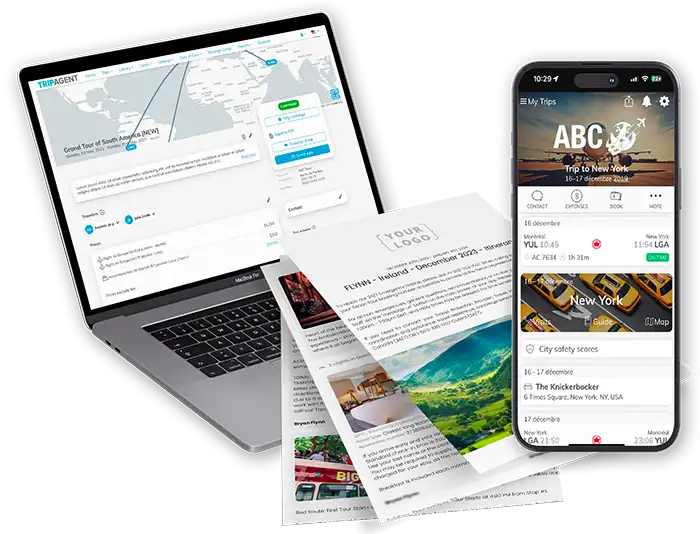
One trip in the agent dashboard, as a branded PDF, and in the mobile app.
What mTrip gives your TMC
One platform, four modules, each with its own page
Three core modules and one optional add-on, duty of care and disruption management, run on one platform and share the same trip data, so a change in one shows up everywhere your travelers look. MICE and events agencies use the same modules for group travel and attendee logistics.
Itinerary management
One structured itinerary per traveler, built from the systems your TMC already uses.
- Imports from Amadeus, Sabre, Travelport, OBTs, and back-office systems
- One trip record shared by the app, web itinerary, and PDF
- All corporate accounts managed from one dashboard
Travel document delivery
Stop emailing tickets and vouchers one by one. mTrip sends them automatically.
- E-tickets, vouchers, and policy documents under your brand
- Delivered by web itinerary, PDF, and mobile app
- Updated automatically when a flight changes
White-label mobile app
Give corporate travelers one app, carrying your TMC’s name, for the whole trip.
- iOS and Android app with your name, logo, and colors
- Flight alerts, offline destination guides, and messaging with your team
- Travelers forward their own bookings, and AI adds them to the itinerary
Duty of care and disruption management(optional)
For TMCs that run a duty-of-care program: risk monitoring, disruption management, and traveler tracking, built on the same itineraries.
- Paid add-on, with or without the app and PDF products
- Configured per corporate account
What changes for your team
What changes for agents, account managers, and your clients’ travelers
Agents and operations
mTrip gives TMC agents one itinerary per traveler. Bookings made in different systems become one trip record, so agents send one branded document instead of separate confirmations in different formats. A change to a trip updates the app, web itinerary, and PDF together.
Account managers
mTrip lets account managers set branding, features, and reporting per corporate account and manage every account from one dashboard. Clients see the TMC’s work after the ticket is issued, not only during booking.
Your clients’ travelers
With mTrip, a TMC’s corporate travelers get one branded place for the itinerary, documents, destination information, and contact with the travel team, online and offline, instead of separate emails, PDFs, and booking tools.
Multi-account and white label
One platform for every corporate client you serve
A TMC sets the branding, the features, and the reporting for each corporate account, then manages all of them from one dashboard. One client gets the full app and documents. Another starts with web itineraries and PDF only. A full white-label implementation publishes the app on iOS and Android under your own app name, with no visible reference to mTrip in the traveler experience.
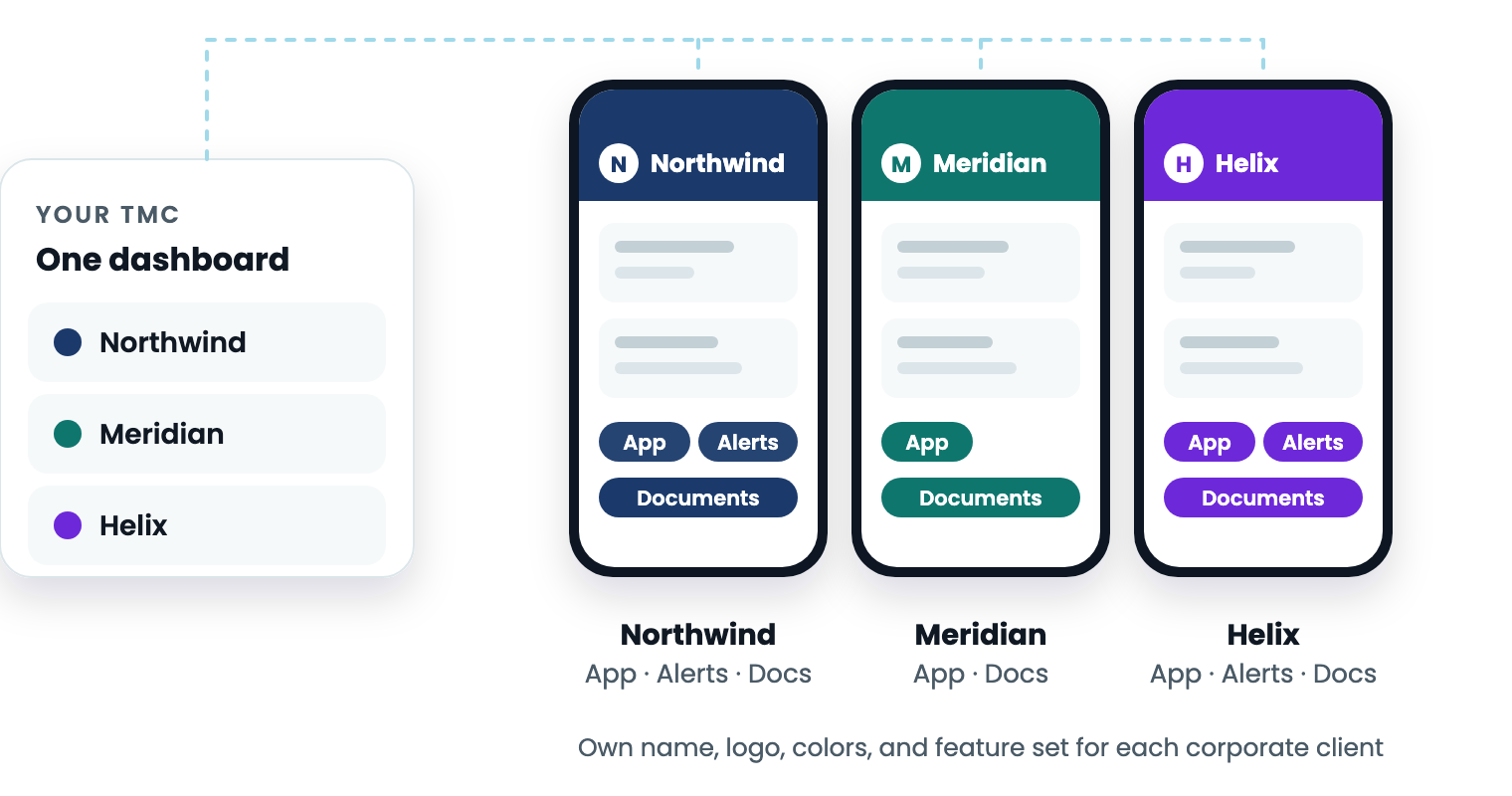
One TMC dashboard, three corporate clients, three brands. Illustration with sample data.
- Name, logo, and colors set per corporate account on the app, web itinerary, and documents
- Features switched on per account, with reporting kept separate for each client
- Nine languages and multi-currency support for multi-market portfolios
- Custom development when a client needs a workflow or integration that does not exist yet
mTrip vs. the alternative
Why booking tools alone are not enough for TMC delivery
GDS, OBT, and back-office platforms are essential. mTrip adds the branded traveler layer that turns those systems into a clearer post-booking experience for corporate clients.
| Capability | Existing booking stack alone | Manual document workflow | mTrip traveler layer |
|---|---|---|---|
| Consolidates GDS, OBT, back-office, and document data for traveler delivery | Usually split across tools | Manual assembly | Yes |
| Branded web, app, PDF, and document delivery under your TMC identity | Depends on each system | Template branding only | Yes |
| Connected app and web updates when trip data changes | Depends on source system | Manual resend | Yes |
| Duty-of-care alerts, disruption management, and traveler tracking | Requires a separate workflow | No | Via duty-of-care add-on |
| Multi-account branding and feature configuration | Limited by each system | Hard to scale | Yes |
| Available in multiple languages | Depends on each system | Manual translation | 9 languages |
| Custom development for workflows and integrations unique to your TMC | Vendor dependent | No | Yes |
Thinking about building this in-house? An in-house app means maintaining native iOS and Android apps, every GDS and OBT integration, and branding for each client. mTrip carries that for 300+ travel brands, with in-house development since 2009. The business travel app page and the build vs. buy guide cover the trade-offs in detail.
Integrations
Connects to the Systems Travel Management Companies Already Use
mTrip integrates directly with the GDS platforms, OBT and mid-office systems, and communication tools your team relies on, with no manual exports. Beyond the platforms listed below, mTrip can integrate with any OBT, profile management system, back-office platform, or other corporate travel tool already in your stack.
GDS Systems
OBT (Corporate Booking Tools)
TMC Back-Office
Automation & Communication
Getting Started
How TMCs Onboard Onto mTrip
Each TMC is assigned a dedicated Customer Success Manager who manages onboarding, configures integrations, and trains your team. Most TMCs are fully operational within a few weeks of kickoff.
-
1 · DISCOVERYScoping call covering your GDS, OBT, and mid-office setup, plus your corporate account structure
-
2 · CONNECTGDS integrations (Amadeus, Sabre, Travelport) and mid-office connections configured so bookings flow in without manual exports
-
3 · CONFIGURE & TRAINBranded mobile app and document templates configured per corporate account; your team trained on the platform
-
4 · GO-LIVE & SUPPORTFully operational within a few weeks of kickoff, with ongoing support from your dedicated Customer Success Manager
By the numbers
Trusted by TMCs and Corporations Worldwide
mTrip was founded in Montreal in 2009 and has been part of Digitrips Group since 2018. It serves 300+ travel brands in 35+ countries and handles more than 4 million trips a year. The platform runs in 9 languages, integrates natively with Amadeus, Sabre, and Travelport, and is rated 4.9/5 on G2. mTrip is a member of the Global Business Travel Association (GBTA).
Awards
Member of
 GBTA
GBTAQuestions TMCs ask
Frequently Asked Questions
About the platform
What is TMC software?
TMC software is the technology a travel management company uses to run corporate travel for its clients. mTrip is the post-booking layer on top of a TMC’s GDS, OBT, and back-office systems: it unifies every booking into one trip record per traveler and delivers branded itineraries and documents through an app, a web itinerary, and PDF, with optional duty of care and disruption management.
Can mTrip unify bookings from different systems into one itinerary?
Yes. mTrip pulls bookings from your GDS, OBT, and back-office system into one trip record per traveler, what the industry often calls a super PNR. Agents then send one branded itinerary, as an app, web itinerary, or PDF, instead of separate confirmations in different formats. Travelers can also forward bookings they made themselves, and mTrip’s AI adds them to the trip.
Does mTrip replace our GDS, OBT, or back-office system?
No. mTrip sits on top of systems such as Amadeus, Sabre, Travelport, Concur, Cytric, and TMC back-office platforms. Your team keeps its booking, profile, expense, and operational workflows while mTrip handles the traveler-facing layer across app, web, PDF, documents, and alerts.
How is TMC software different from corporate travel booking tools?
Corporate travel booking tools, such as online booking tools, let employees search and book trips within company policy. TMC software like mTrip works after the booking: it collects trip data from those tools and the GDS, then delivers itineraries, documents, and alerts under the TMC’s brand. The two work together, since mTrip connects to Concur, Cytric, GetThere, and other OBTs instead of replacing them.
Do corporate travelers have to install an app?
No. mTrip also delivers each trip as a web itinerary that stays in sync with the app, and as PDF documents, so travelers who never install the app still have their trip details. The mobile app adds flight alerts, offline destination guides, and in-app messaging with your travel team, carried under your brand on iOS and Android. See the business travel app page for the full feature set.
Can we white-label mTrip under our own brand for each corporate client?
Yes. mTrip can apply your TMC’s name, logo, colors, and brand identity across the mobile app, web itinerary portal, and travel documents. Full white-label implementations can publish the mobile app on iOS and Android under your own app name, with no visible reference to mTrip in the traveler-facing experience. Feature sets can also be configured per corporate account.
Can mTrip handle multi-brand and multi-account TMC operations?
Yes. mTrip’s platform is built for multi-brand and multi-market operations. TMCs can manage multiple corporate client accounts from a single dashboard, with separate branding, feature configurations, and reporting for each account. This works for TMCs of any size, including networks servicing diverse corporate portfolios across multiple markets.
Integrations
Which GDS systems does mTrip integrate with?
mTrip integrates natively with Amadeus, Sabre, and Travelport. Booking data from these systems is automatically consolidated into one branded itinerary per traveler. mTrip also connects with major OBT platforms (Concur, Cytric, GetThere, Airgateway) and TMC back-office systems including Cornerstone, Gestour, BCD Travel, CWT, and TravelPerk. Travelers can also forward confirmation emails for bookings they made themselves, and mTrip’s AI adds them to their itinerary in the app.
Duty of care and disruption management
Are duty of care and disruption management included, or a separate add-on for TMCs?
Duty of care and disruption management come as a paid optional module. It can be added to the core itinerary platform or purchased independently of the mobile app and PDF products. See mTrip’s travel risk management software page for the full feature set, or the traveler tracking page for how location monitoring works.
Build, cost, and onboarding
Should a TMC build its own traveler app or buy one?
Whichever route you take, an in-house app means maintaining native iOS and Android apps, integrations with each GDS, OBT, and back-office system, itinerary and document sync, translations, and branding for each corporate client.
mTrip carries that work for 300+ travel brands and offers custom development and an API when one client needs something specific. The business travel app page and the build vs. buy guide cover the trade-offs in detail.
How much does TMC software like mTrip cost?
mTrip does not publish a price list. The monthly fee is based on itinerary volume. A setup fee depends on the number of integrations and the branding scope, and duty of care and disruption management is priced as an add-on. A specialist scopes your volume and integrations during the demo and sends a proposal afterwards.
How long does it take to onboard a TMC onto mTrip?
Onboarding timelines vary based on the number of GDS and mid-office integrations required and the complexity of your corporate account structure. Each TMC is assigned a dedicated Customer Success Manager who manages the onboarding process in four stages: discovery, GDS/mid-office connection, branded app and document configuration, and go-live. Most TMCs are fully operational within a few weeks of kickoff.
Track record
Is mTrip an established vendor with independent validation?
Yes. mTrip has been developed in-house since 2009 and is rated 4.9/5 on G2 by travel industry professionals. The platform has received the Phocuswright Innovator Award, a Webby Award, Best Mobile App from EyeForTravel, and an ACTE Award, and mTrip is a member of the Global Business Travel Association (GBTA).
Beyond business travel
mTrip also covers leisure travel, meetings, and events
mTrip serves travel agencies, tour operators, and DMCs in leisure travel, and MICE agencies, incentive houses, and PCOs for meetings and events, with the same platform: itineraries, branded documents, and a white-label app. Each segment has its own page.
Leisure travel
Travel agencies, tour operators, and DMCs use mTrip for itineraries, branded travel documents, and a white-label mobile app on leisure trips.
Software for travel agencies →
Software for tour operators →
Software for DMCs →
Meetings and events
MICE agencies, incentive houses, and PCOs use mTrip to give attendees a branded event app with agendas and real-time updates.
Ready when you are
See mTrip on your own GDS, OBT, and back-office setup
See how mTrip turns the trip data your TMC already holds into branded itineraries, documents, and a mobile app for each corporate client.
300+ travel brands. 35+ countries. Rated 4.9/5 on G2.