
New feature · Import bookings automatically
Import bookings automatically with the new AI Import Wizard
This AI tool for travel agencies and tour operators is new in mTrip. Upload a booking confirmation or paste the text, and the AI Import Wizard lets your team import bookings automatically into a draft itinerary, saving a lot of time on every trip.
It handles the import step. Building, branding, and delivering the trip happens in the mTrip itinerary builder. Your team starts from the confirmations it already receives and reviews the draft before anything reaches a traveler.
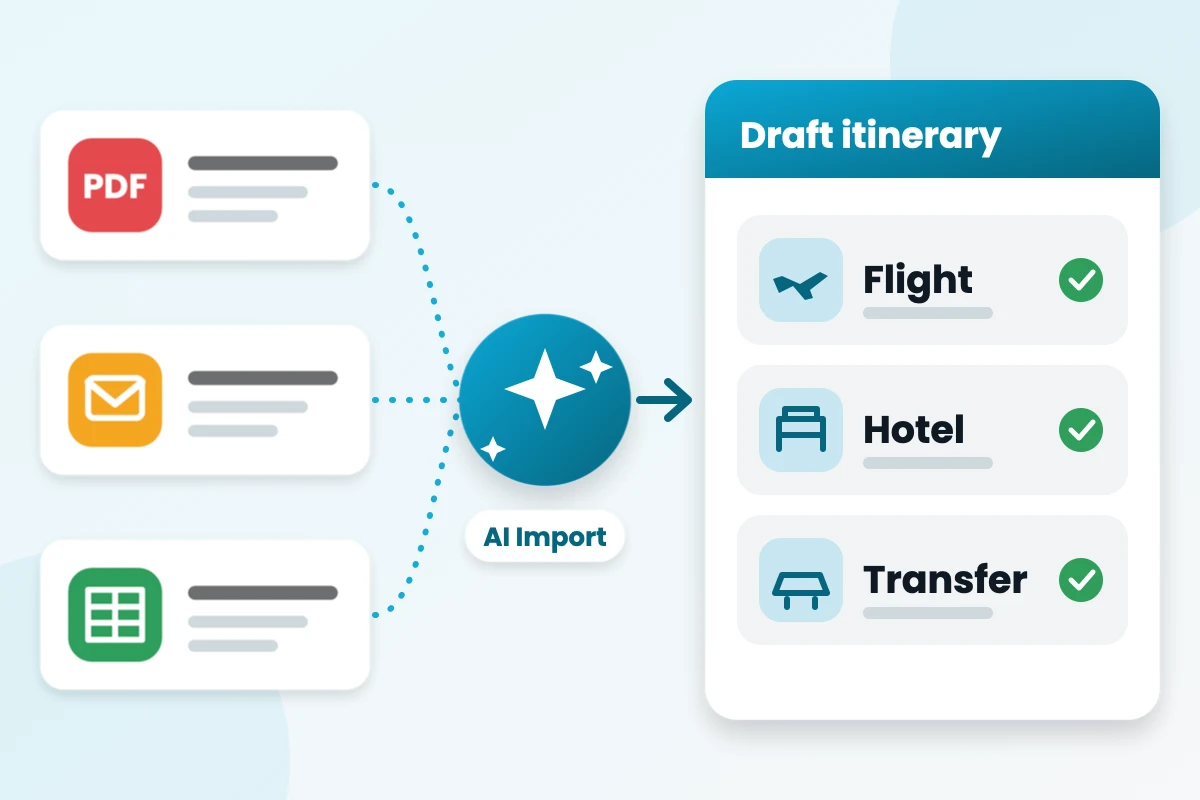
How AI import speeds up itinerary creation
The wizard replaces the copy-and-paste step at the start of every itinerary your travel agency or tour operator team builds.
- Save a lot of time on every itinerary. Instead of retyping each confirmation, your team uploads or pastes it and reviews the result. The longest manual step in building a trip becomes a quick check.
- Less retyping. Flights, hotels, transfers, and activities from a confirmation land in the itinerary without being copied by hand.
- A filled-in itinerary to start from. Your team edits a draft that already holds the booking details, instead of building from nothing.
- One way to handle mixed sources. PDFs, emails, spreadsheets, and web pages all go through the same wizard.
- Your team stays in control. Nothing reaches a traveler until your team has checked and edited the draft.
For example, a tour operator has a flight confirmation email, a hotel voucher, and a transfer note for one client. The team pastes them into the wizard, gets one draft with every segment in place, and spends its time on checking the details and adding its own descriptions and images.
How to import bookings automatically
The AI Import Wizard is an mTrip feature that reads a booking confirmation, a PDF, a spreadsheet, or pasted text and organizes the details into a draft itinerary. Your team reviews and edits the draft before sharing it with travelers.
Once reviewed, the draft opens in the itinerary builder. There you add your own content, apply your brand, and deliver it through branded travel documents, a web itinerary, or the mobile app.
Which booking documents you can import automatically
The wizard reads four kinds of input:
 PDF: booking confirmations and travel documents.
 Excel: trip information held in spreadsheets.
 Word: booking and itinerary information in documents.
 Plain text: pasted travel details, including confirmation email or booking webpage content.
Typical sources include Viator, Expedia TAAP, Booking.com, and airline confirmations. Bookings that live in a GDS or a mid-office system arrive through those connections instead, which the itinerary builder page explains. Our practical guide to AI itineraries covers how AI fits into itinerary work.
Included for existing mTrip clients
The AI Import Wizard is included at no additional cost for existing mTrip clients, so travel agencies and tour operators already on mTrip can use it.
To see it on your own documents, request a demo and bring the confirmations your team handles most often. A free trial follows the demo. The demo also covers the rest of the travel agency software. Looking at AI more broadly? Our guide to the best AI tools for travel agencies covers the options.
Questions about how to import bookings automatically
How do I import bookings automatically into an itinerary?
Upload a supported file or paste the booking details into the AI Import Wizard in mTrip. The wizard organizes the details into travelers, flights, hotels, activities, cruises, transfers, and additional services in a draft itinerary. Your team then checks the draft against the source booking and continues in the itinerary builder.
Who is the AI Import Wizard for?
The AI Import Wizard is for travel agencies and tour operators that build itineraries from booking confirmations, supplier documents, and spreadsheets. It saves the time spent retyping those bookings. It is built for agency and operator teams of any size, and your team always reviews the draft before it reaches a client.
Can I import booking confirmation emails automatically?
Yes. Paste the text of the confirmation email into the AI Import Wizard, and it organizes the booking details into a draft itinerary. Your team checks the result against the original email, corrects anything that is off, and then shares the trip.
What is the AI Import Wizard?
The AI Import Wizard is an mTrip feature that reads booking confirmations, documents, spreadsheets, and pasted text, then organizes the details into a draft itinerary. Your team reviews the draft, corrects anything that is off, and continues in the itinerary builder, where it adds content, applies its brand, and delivers the trip to travelers.
Is the AI Import Wizard the same as the itinerary builder?
No. The AI Import Wizard is one feature inside the mTrip itinerary builder, and it covers the import step only. The builder is where your team edits the trip, adds its own descriptions and images, applies its brand, and delivers the itinerary as branded travel documents, a web itinerary, or in the mobile app.
What formats does the AI Import Wizard support?
The AI Import Wizard supports PDF, Excel, Word, and plain text. Plain text includes booking details supplied through confirmation emails and booking web page content. Typical sources include Viator, Expedia TAAP, Booking.com, and airline confirmations. Bookings held in a GDS or a mid-office system arrive through those connections instead.
Which travel details can it organize?
The AI Import Wizard organizes traveler information, flights, hotels, activities, cruises, transfers, and additional services into a draft itinerary. Your team then checks names, dates, times, locations, and included services against the source booking and adds its own content before sharing the trip.
Should I review an imported itinerary?
Yes. Import results depend on the quality of the source, so your team checks the draft against the original booking before sharing it. Compare traveler names, dates, times, locations, and included services, and correct anything that is off. Nothing reaches a traveler until your team has reviewed it.
Is the AI Import Wizard included for existing mTrip clients?
Yes. The AI Import Wizard is included at no additional cost for existing mTrip clients. To try it on your own documents, request a demo and bring the confirmations your team handles most often. A free trial follows the demo.
See the AI Import Wizard on your own bookings
Request a demo